
How to choose a real estate CRM in India: a checklist for builders and channel partners
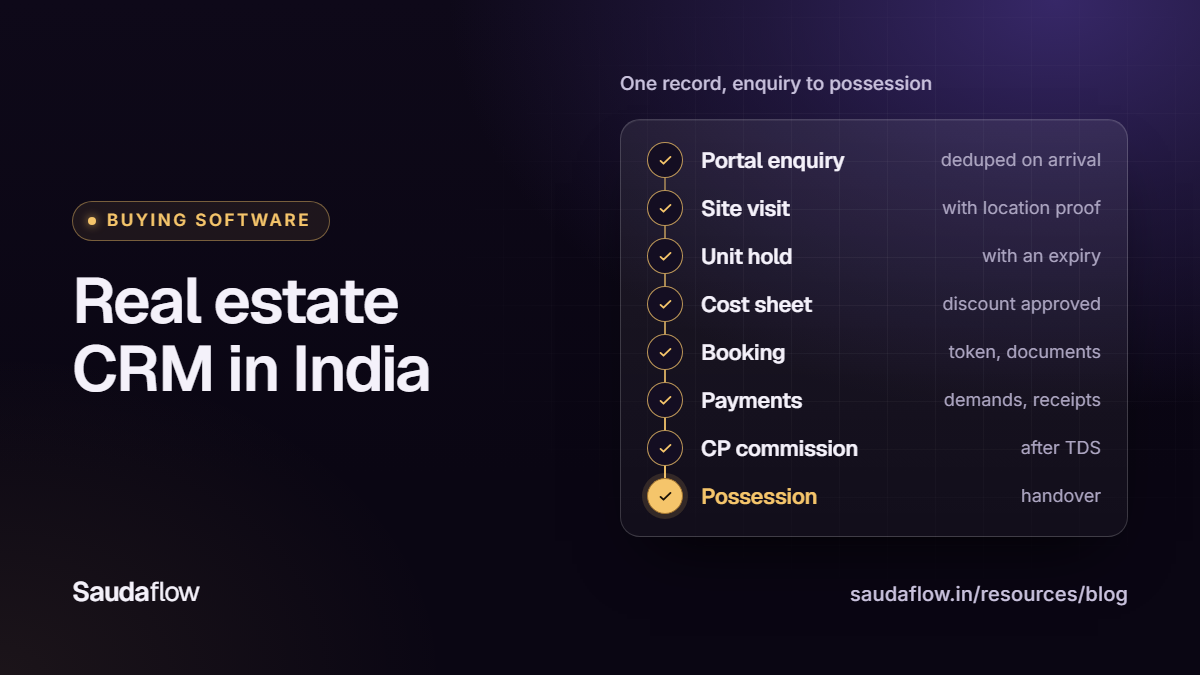
A real estate CRM is software with one job: make sure no enquiry, site visit, unit or rupee goes missing between the first call and the channel partner's payout.
No CRM is best for every real estate business in India. This guide walks the lifecycle stage by stage: the problem, the demo questions and the red flags, then pricing, total cost and how you leave.
Bring one real case to every demo
Slides show what a product is meant to do. Give every vendor the same case to run live while you watch:
- a buyer who enquires on two portals, then walks in with a channel partner;
- a site visit, a hold on one specific unit, and a cost sheet with a discount;
- a booking with a payment schedule, a bounced cheque, and the CP's commission.
1. Intake from portals, ads and WhatsApp, without duplicates
The problem: the same buyer arrives from three places, and either three people call them or two people fight over them. The duplicate check has to happen at intake, not in a monthly clean-up.
Ask in the demo:
- Which sources connect directly (99acres, MagicBricks, Housing.com, Meta and Google lead forms, your website, WhatsApp) and which need a manual upload? Show one lead arriving from each.
- When the same mobile number arrives again next week, is it a new lead or a duplicate touch on the existing one? Who is told, and is the original source kept?
- Does it match one number written three ways: with +91, with a leading 0, and an NRI number with its country code?
Red flags: duplicates found only by a weekly merge report; an "integration" that is really a spreadsheet uploaded every evening.
2. Speed-to-call and lead routing
The problem: the enquiry waits in an inbox while someone else calls the buyer first. Software cannot dial for you, but it can close the gap between "the lead arrived" and "the right person knows".
Ask in the demo:
- Show the routing options: round-robin, by project, language, territory or workload. Can I test a rule on a sample enquiry before switching it on?
- When nobody is eligible (leave, a Sunday, a full queue), where does the lead wait, and who is alerted?
- Can I see time from arrival to first call, per person and per source, and open the leads behind it? How is a missed call from the buyer counted: as a response, or as a callback still owed?
Red flags: routing that cannot explain its choice; a "first response" figure that counts an automatic WhatsApp reply as a call.
3. Call logging and WhatsApp follow-ups
The problem: calls happen on personal phones, outcomes live in memory, and follow-ups slip.
Ask in the demo:
- Log a call with its outcome and next follow-up on the phone your telecallers use. How many taps? Does "not interested" need a reason, and does "no answer" create a callback?
- Do calls go out from the telecaller's own SIM or from a virtual or IVR number? Who pays per minute, and does a missed call to that number become a lead?
- If call recording is offered, how is the buyer told, who can play a recording, and how long is it kept?
- What does the app read on the phone (call log, contacts, or only its own calls), and can a user switch it off?
Ask about WhatsApp too. Its Business Messaging Policy needs the buyer's opt-in. A 24-hour customer service window opens when the buyer messages or calls you on WhatsApp; after it closes, only pre-approved templates can be sent. The CRM should show each buyer's opt-in and whether the window is open.
Red flags: a "connected calls" count you cannot open; more phone permissions than features.
4. Site visits with proof
The problem: the report says "visit done", nobody can show the buyer was at the site, and the CP and your sales team both claim the visit.
Ask in the demo:
- What does a check-in record: location, accuracy, time, photo? Where is the distance measured from, and who sets the project's location?
- When GPS is weak or the project has no location set, does the visit show as unverified, or quietly pass?
- Can a visit close without structured feedback (interest, objection, next step), and where does a no-show go?
Red flags: every check-in shows green, even ones made from the office; a flagged visit that can be edited until the flag disappears.
5. Inventory holds
The problem: two salespeople promise flat A-1104 to two families on the same Sunday, or a "temporary" hold lasts three weeks.
Ask in the demo:
- Can two people hold the same unit at once? Try it.
- Does every hold carry an owner, a reason and an expiry? What happens at expiry, and is an extension an approval or just an edit?
- Is "booked" a status anyone can set, or the result of an actual booking record?
Red flags: inventory in a separate spreadsheet "synced" overnight; status changes with no history of who changed what.
6. Cost sheets and discount approvals
The problem: a quote goes out from an old rate card, and the buyer arrives at booking with a figure nobody recognises.
Ask in the demo:
- Make a cost sheet for one unit: base price, floor rise, PLC, parking, other charges, taxes and the payment schedule. Is it calculated from a rate card, or typed in?
- Is every cost sheet that was sent stored with its date, author and figures?
- Enter a discount above what a salesperson may give alone. Who approves it, can rules differ by project, and can the buyer see the price before approval?
Red flags: discounts agreed on WhatsApp and typed in later; anyone able to approve their own request.
7. Bookings and payment schedules
The problem: the booking lives in one file, the receipts in another and the demand letters in a third.
Bookings also carry a legal check: under section 13 of the RERA Act, 2016, a promoter cannot take more than 10% of the cost of the apartment, plot or building as an advance or application fee before a written agreement for sale is signed and registered.
Ask in the demo:
- Create a booking on a construction-linked plan. Raise a demand, record a part payment, then a bounced cheque. Does the balance stay right?
- Does the product warn you when money received before a registered agreement for sale crosses 10% of the cost, and keep that warning on the record?
- Which documents hang off the booking, from booking form to possession letter, and who owns each step?
Red flags: receipts that can be edited or deleted instead of reversed; a balance that changes with no record of why.
8. Channel partner attribution and commission
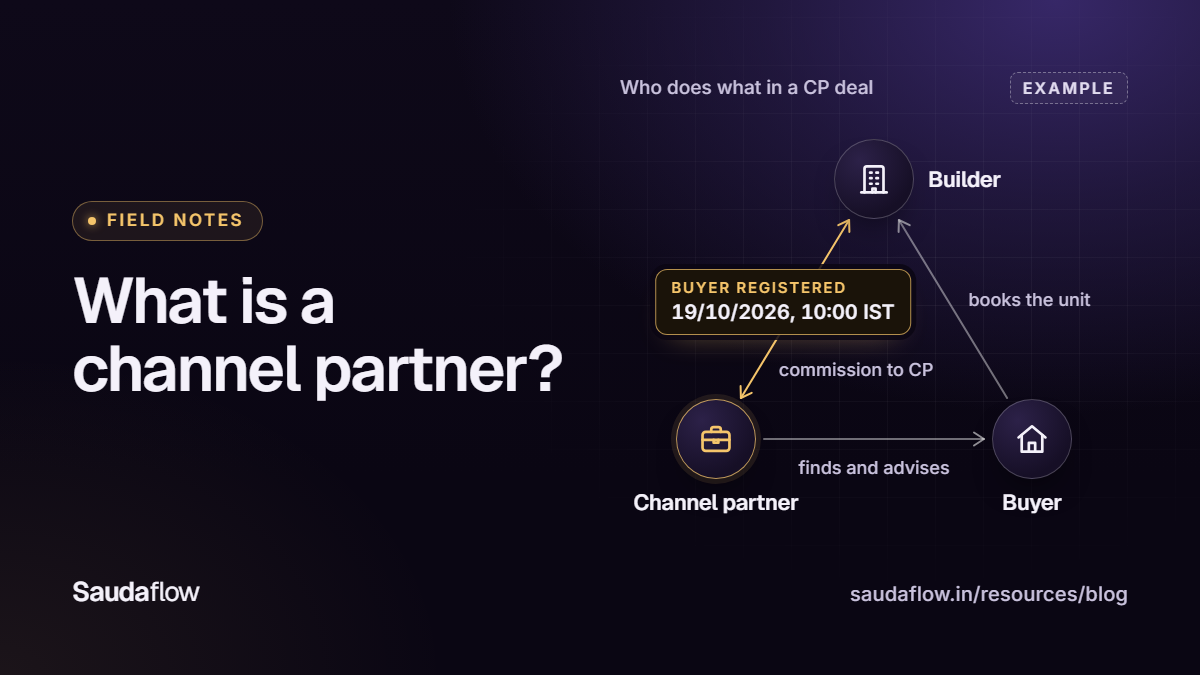
The problem: the CP says the buyer was theirs, your team says the buyer came site-direct, and three months later nobody can prove either. Ownership should come from a timestamped registration and an attribution window agreed with your partners (see how channel partner deals work), never from whoever called last.
Ask in the demo:
- How does a CP register a buyer, what proves the time, and can the CP see their own registrations? Can the window differ by project or partner?
- Walk one booking into commission: when does it accrue, when is it scheduled, when is it paid? What happens if the booking is cancelled after a payout?
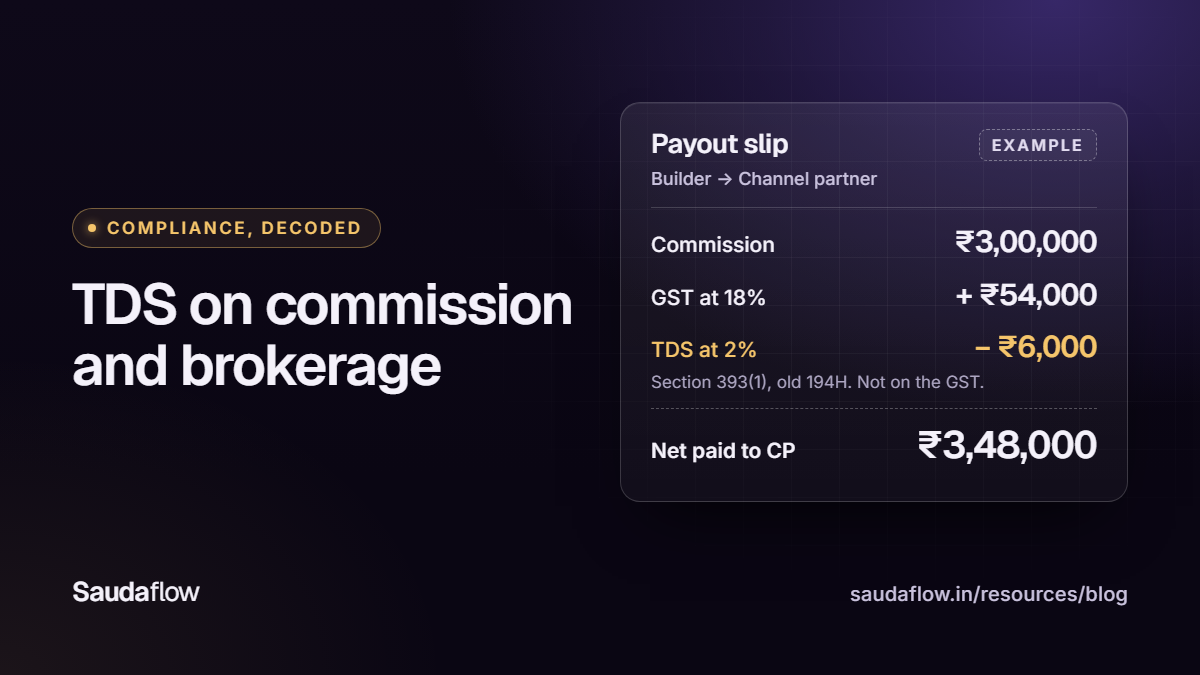
- Is TDS calculated under the current law? Since 01/04/2026, TDS on commission or brokerage falls under section 393(1) of the Income-tax Act, 2025, the old section 194H: 2% once a partner's commission in the tax year crosses ₹20,000.
- Does a lapsed RERA agent registration stop that partner's payout?
- If you are a CP firm: can you see, builder by builder, which bookings owe you commission, which milestone triggers it, what TDS was cut and what is overdue?
Red flags: commission tracked in a spreadsheet outside the CRM; CPs who must phone your accounts team to know what is due.
9. Buyer post-sales and possession
The problem: after booking, the buyer phones again and again for receipts, demand letters and construction updates.
Ask in the demo:
- Can a buyer see their own unit, payment schedule, receipts and documents, with the same figures your finance team sees, reversals included?
- How does the buyer sign in, and has a sign-in code actually reached a real buyer's phone or inbox in a test?
- Are queries tracked as tickets with an owner, and does the record carry on to possession: snag list, handover documents, final settlement?
Red flags: a portal that copies data overnight instead of reading the live record; buyer access switched on for everyone by default.
10. Reporting by cost per booking, not cost per lead
The problem: marketing reports the cheapest leads; sales says those leads never book. Cost per lead rewards volume. Cost per booking rewards what you actually want.
Ask in the demo: can I see spend, enquiries, site visits and bookings by source in one report, click any number to open its records, and tell a missing value from a zero?
Red flags: dashboards you cannot click through; call counts shown without the visits and bookings they produced.
11. Mobile and offline for field teams
The problem: the site has no signal, so the visit is not logged, and by evening the details are gone.
Ask in the demo:
- Put a phone in airplane mode. Log a call, a check-in and visit feedback, then turn signal back on. What syncs, with what time, and what does the app refuse to do offline?
- If two people change the same record offline, do you see a conflict, or does the last write quietly win?
- Which of the steps above can a salesperson finish on the phone, and which need a laptop?
- Which phones are supported, iPhones included, and is the Android app on Google Play or installed directly?
Red flags: an "offline mode" that is only a read-only copy; sync that silently overwrites.
12. Buyer data in the DPDP era
The problem: buyer numbers sit in personal phones, WhatsApp groups and exported sheets, and nobody can say who has what.
From 13/05/2027, the Digital Personal Data Protection Act, 2023 and its Rules hold the business that decides how buyer data is used, the Data Fiduciary, responsible for it, including what its CRM vendor does on its behalf (section 8(1)). Failing to take reasonable security safeguards can then attract a penalty of up to ₹250 crore. A CRM you sign for today will still be running in May 2027, so ask these now.
Ask in the demo:
- Where is consent recorded for calls, WhatsApp and marketing? Is a blank shown as "not recorded", or treated as a yes? Can staff reverse a buyer's own opt-out?
- Who can export the lead list, and is every export logged? Rule 6 asks for access control, logs kept for a year, and backups.
- How do I find, export or erase one person's data?
- If there is a breach, when will you tell us? Rule 7 gives the fiduciary 72 hours to send the Data Protection Board a detailed report.
Red flags: a "DPDP compliance" claim on a slide with no answers to these questions; shared logins; exports nobody can trace.
How pricing works for a real estate CRM in India
Real estate CRMs in India usually charge per user per month. The small print decides the bill. Here is what four vendors' own pricing pages said on 16/10/2026 (Leadrat re-checked 22/10/2026): pricing models, not a ranking.
| Vendor | What its pricing page said on 16/10/2026 |
|---|---|
| Sell.Do | Priced "per active user per month, with plans starting at a minimum of 5 users", quoted for each organisation rather than from a published rate card. AI capabilities and communication channels are usage-based add-ons. |
| Leadrat | "One plan with every feature. Pay per user, billed annually." The per-user rate drops at 20, 30, 50 and 100 users, with a custom plan above 100. On 22/10/2026 its price calculator opened at 10 users. |
| telecrm | ₹1,099 per user per month billed quarterly, or ₹799 billed annually. Add-ons include Chat Sync at ₹200 per user per month and a one-time ₹1,999 WhatsApp API setup; WhatsApp API messaging charges are paid separately. |
| Saudaflow | Solo: ₹599 a month for one person, or ₹6,468 for the year. Professional Team: ₹899 per seat per month from two seats, invoiced quarterly, or annually for 10% less. Custom: ₹1,499 per seat per month plus a one-time setup fee, quoted. All Saudaflow prices exclude GST; 18% GST is added on top. |
Questions that change the bill:
- Is there a minimum number of seats? Do channel partner and buyer portal logins count as seats?
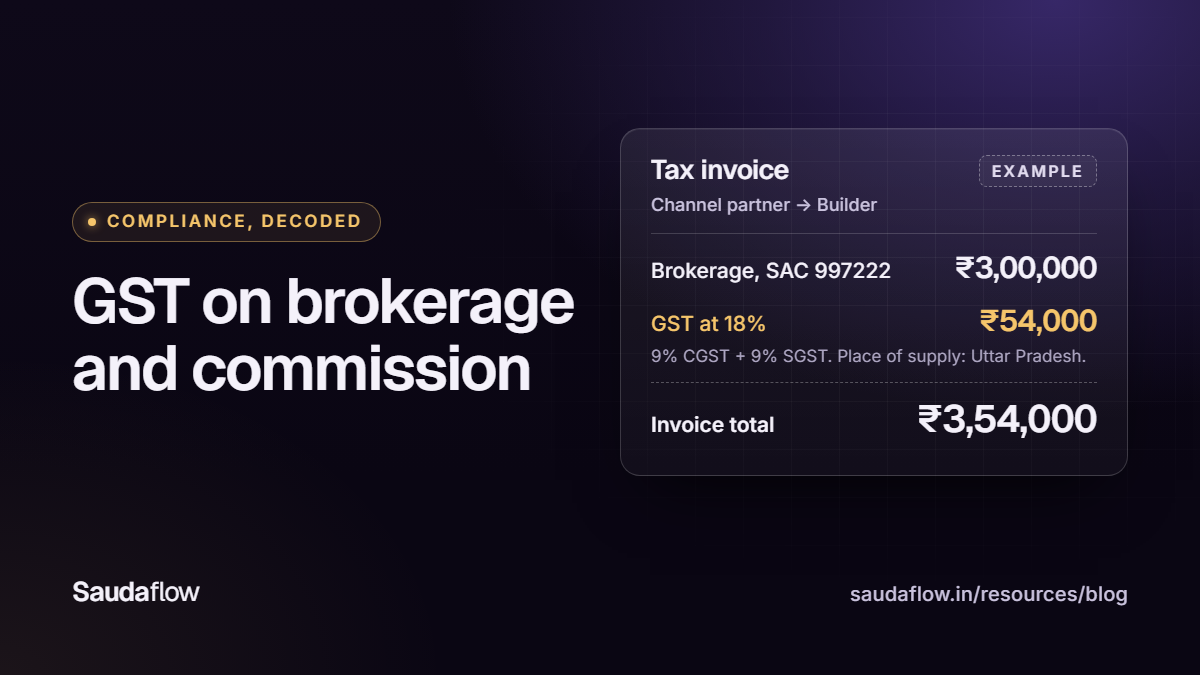
- Is GST included in the quoted price, or added on top? At 18%, the difference shows on every invoice.
- What is charged by usage (WhatsApp, SMS, call minutes, AI features, storage), whose account it runs through, and who bills it?
- Is there a setup, migration or training fee, who imports your existing data, and does the plan renew automatically?
- When you leave: ask for a full export in the demo (leads with every call, visit and note, bookings, receipts, the commission ledger, documents and the audit log) as CSV or Excel, not PDF. How long is data kept after you stop paying, and is deletion confirmed in writing?
How Saudaflow approaches it
We build Saudaflow, so read this as our own description, not a verdict, taken from our product pages:
- Intake checks the phone number for an existing contact and lead. Ownership rests on timestamped registration and an attribution window you configure, normally 45 days. See lead management.
- Check-ins are recorded as verified, flagged or unverified, and a missing GPS fix or project location stays unverified. See site visits.
- Commission is the builder's payable ledger and moves through Accrued, Scheduled and Paid; a partner sees their own data in CP Connect. A CP Connect login is not a paid seat, and a lapsed RERA registration blocks that partner's payout. The partner module needs Professional Team or Custom. See channel partners and commission.
- The field app is Android-only: a direct-download test build, not a Google Play release, and there is no iPhone build. When a lead calls, the Android app shows the lead on its own call screen with Answer/Decline, even with the app closed. Supported actions queue offline; a new lead does not, because creating one decides ownership.
- Cost sheets are made in the web app, not the Android app, and carry no payment schedule; the payment milestones sit on the booking. SMS delivery of buyer portal sign-in codes is not live.
- There is no free trial: payment comes before setup. Plans and add-ons are on Saudaflow pricing.
Our CRM comparison checklist has a short version of these questions for any vendor. To put these questions to us on demo data, book a 20-minute demo.
Frequently asked questions
What is CRM in real estate?
Software that records every enquiry and carries it through calls, site visits, unit holds, cost sheets, booking, payments and channel partner commission. The next person sees the full history, and every number in a report traces back to a record.
What features should a real estate CRM in India have?
Duplicate checks at intake, fast lead routing, call and follow-up logging, site visits with location evidence, inventory holds, cost sheets with discount approvals, bookings and payment schedules, CP attribution and commission, a buyer view, reports by cost per booking, offline mobile work and consent records.
How much does real estate CRM software cost in India?
Usually a price per user per month, but minimum seats, the billing period, GST and usage charges change the bill. On 16/10/2026, telecrm listed ₹799 to ₹1,099 per user a month depending on the billing period, Sell.Do quoted each organisation with a 5-user minimum, and Saudaflow listed ₹599 a month for one person (Solo) up to ₹1,499 per seat a month plus a one-time setup fee (Custom), with 18% GST added on top.
Can a real estate CRM connect to 99acres, MagicBricks and Housing.com?
Yes, when the vendor has built that connection and set it up for your own portal account, so test it rather than assume it. In the demo, open a lead that arrived through each portal in the last week, see how a repeat enquiry is handled, and ask what warns you if a feed stops. Saudaflow's portal connections are built but not yet connected live.
Does buying a CRM make us compliant with the DPDP Act?
No. Under the DPDP Act, whose duties apply from 13/05/2027, the business that decides how buyer data is used stays responsible, including for what its vendors do on its behalf. A CRM can help with consent records, access control, access logs, exports and erasure, so ask to see each one working.
Which is the best real estate CRM software in India?
There is no single best one: a two-person CP office and a builder selling six towers need different depth. Shortlist two or three, give each the same real case, and choose the one that runs it end to end in a live demo, at a price you have checked on its own pricing page.
Sources
- Request Pricing | Sell.Do
- Real Estate CRM Pricing | Leadrat
- telecrm Pricing
- Real estate CRM pricing: Solo, Professional Team and Custom
- Lead assignment and routing rules
- The Real Estate (Regulation and Development) Act, 2016 (Act No. 16 of 2016), sections 13 and 9
- Income-tax Act, 2025, section 393: Tax to be deducted at source (Table, serial 1(ii), commission or brokerage)
- Income-tax Act, 2025 comes into force from 1st April, 2026
- Section mapping, Income-tax Act, 1961 to the new Income-tax law (194H to 393(1), Table S.No. 1(ii))
- The Digital Personal Data Protection Act, 2023 (sections 8 and 33, and the Schedule)
- Digital Personal Data Protection Rules, 2025, G.S.R. 846(E) dated 13/11/2025 (rules 1, 6 and 7)
- Notification G.S.R. 843(E) dated 13/11/2025: commencement of the Digital Personal Data Protection Act, 2023 (sections 7 to 17 and 28 to 34 from eighteen months after publication)
- Service messages: the customer service window (WhatsApp Business Platform)
- WhatsApp Business Messaging Policy
- Cost sheet software for Indian real estate
- Buyer Connect: the portal for your home buyer
- Buyer Connect sign-in and code help
Comments
No sign-up and no email address. Comments appear as soon as you post them; obvious spam is held back.