
The unit
Record its number, project, tower, floor, areas and configuration. Use the fields relevant to your project.
Keep commission states and supporting records together. Available on Professional and Custom. Broker workflow. See how it works →
INVENTORY MANAGEMENT
Keep project, tower, floor and unit details in one workspace. Review current availability, an active hold and the recorded price before taking the next sales step.

Before you promise a unit
A building has many similar doors. A useful unit record makes the differences clear before your team shares a price or discusses a booking.
Record its number, project, tower, floor, areas and configuration. Use the fields relevant to your project.
Review the stored unit price and available price history. Confirm the cost sheet and applicable charges before sharing a quote.
See available, on-hold, booked, sold and other configured states with the supporting history.
ILMS draws the architect’s layout to scale and colours each plot by the same status this page describes — available, on hold, booked or sold. Present it to walk-ins, or send a buyer a live layout link that stays current.
Import the architect’s DXF or PDF, check the scale once and link the plots to these unit records. Facing, corner, road width and park-facing are worked out from the drawing.
Explore ILMS site plans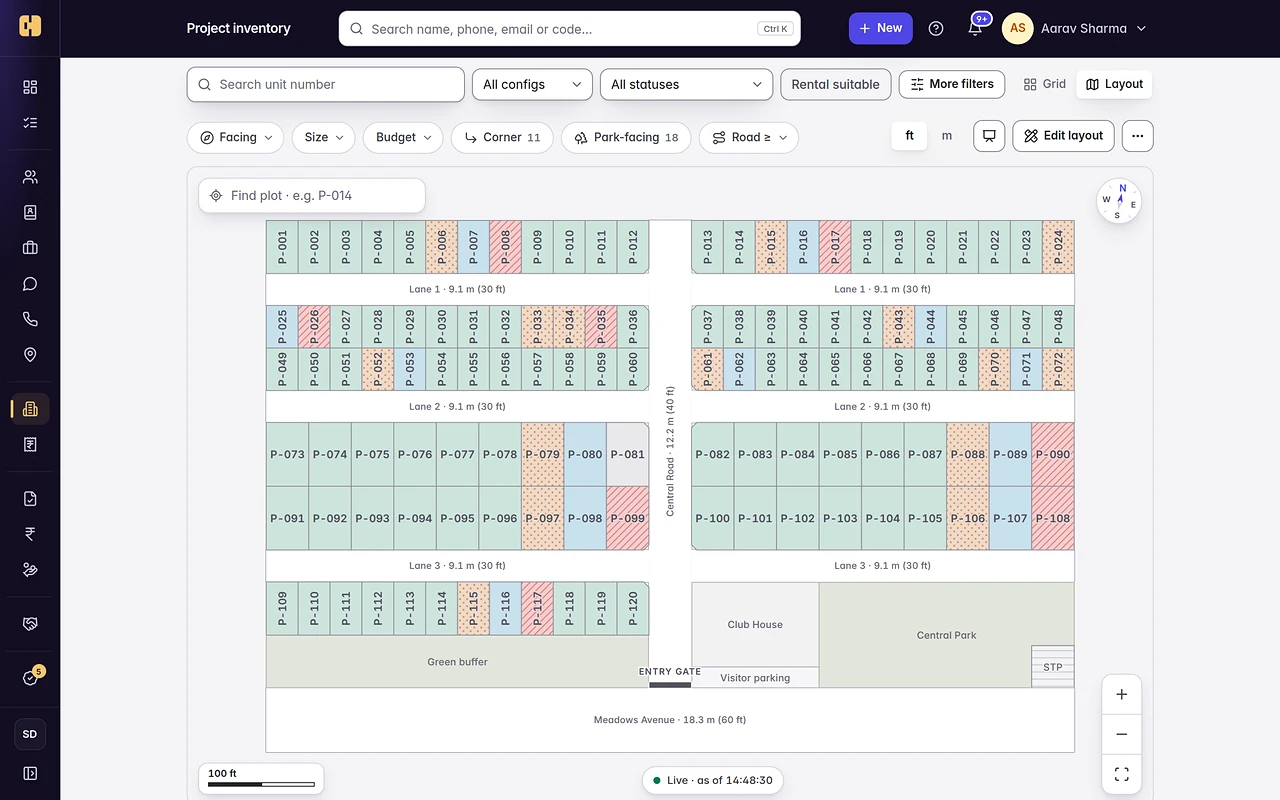
Open the current record before placing a hold. If the status changed, refresh and review the new position.
An authorised person can add a hold with its duration and reason. Review who holds the unit and when it expires.
Expired holds return to available through the expiry process. An extension or release uses the relevant permissions and any applicable approval.
A unit becomes booked through its booking record. Editing the status is not a substitute for completing that workflow.
Blocked is an administrative reserve, not proof that a token payment was received. A hold is temporary and a booked unit has a booking record. Follow the status and its supporting details together.
The product checks permitted status changes and records the actor and history. A disconnected screen or an old exported sheet still needs a fresh check before a commitment is made.
Project and role access determine which inventory and financial details people can see. Review the partner’s actual view before publishing information to them.
Channel partners, the commission ledger, CP Connect and Buyer Connect require Professional Team or Custom.
Publishing inventory out to property portals is not provided by the current syndication workflow. Incoming enquiry connections are a separate capability and need setup.
Check availability, a hold, its expiry and the booking record with your sales and operations teams.