
Builders & developers
Connect enquiries to projects, inventory and bookings. Give managers a view of follow-up and pending decisions.
For your sales organisation →Keep commission states and supporting records together. Available on Professional Team and Custom. Broker workflow. See how it works →
REAL ESTATE CRM · BUILT FOR INDIA
Keep your leads, follow-ups, site visits and bookings in one place. So your team knows who to call, what to do next, and where each sauda stands.
For builders, developers and channel partners.
Talk to the Saudaflow team — we set up your projects and import your Excel for you.
FROM ENQUIRY TO YOUR TEAM
Connect the portals and lead forms your team uses. Keep the source with the enquiry, so follow-up starts with context.
 Webhook delivery
 Webhook delivery
 Housing.comWebhook delivery
 Google AdsKey-checked delivery
 File import
 File import
 File import
 File import
Connectors are available in the product. Gold marks a source that delivers into Saudaflow; the rest are records you bring in yourself — a checked file import, or a form on a page you run. Activation depends on your provider account, access and a tested delivery. Provider names and logos identify supported sources and do not imply endorsement; where an owner’s own brand terms do not permit us to show their mark, the tile carries their name set in our type.
Explore integrationsLESS CHASING. MORE CLARITY.
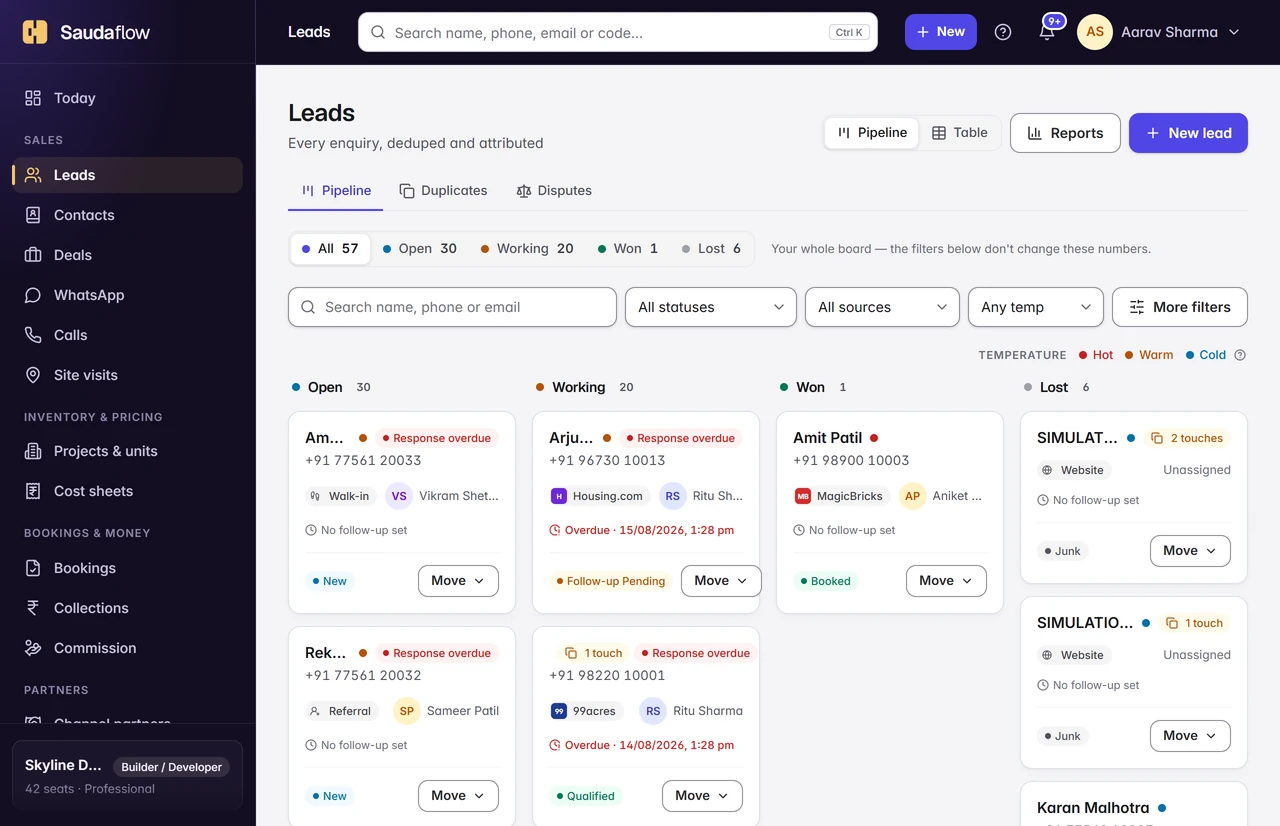
A lead should carry its history forward. Give callers, field teams and managers the context they need at each handover.
Capture the source, check for duplicates and record registration time. Use your configured ownership window to handle competing introductions.
Lead management →See the next task, log the call outcome and set a callback. Give the next person a clear note instead of another unanswered question.
Call logging →Schedule a visit, record the check-in and capture feedback. Location verification needs a project pin and usable location accuracy.
Site visits →Follow bookings and payment schedules. On Professional Team and Custom, track commission from Accrued to Scheduled to Paid.
Compare plans →AT THE DESK. AT THE SITE GATE.
The Android app puts the next visit, the lead and the call outcome close to hand. Supported field actions can queue when the signal drops, with pending work and conflicts shown clearly.
Android test build available. An iPhone release has not been verified. Screens below are rendered from the app with demo data.


ILMS · FOR BUILDERS AND DEVELOPERS
ILMS turns the architect’s DXF or PDF into a to-scale site plan wired to your inventory — every plot’s status on the plan, presentation mode with a 3-D view for walk-ins, and a live layout link for WhatsApp.
Included in Professional Team and Custom.
See ILMS site plans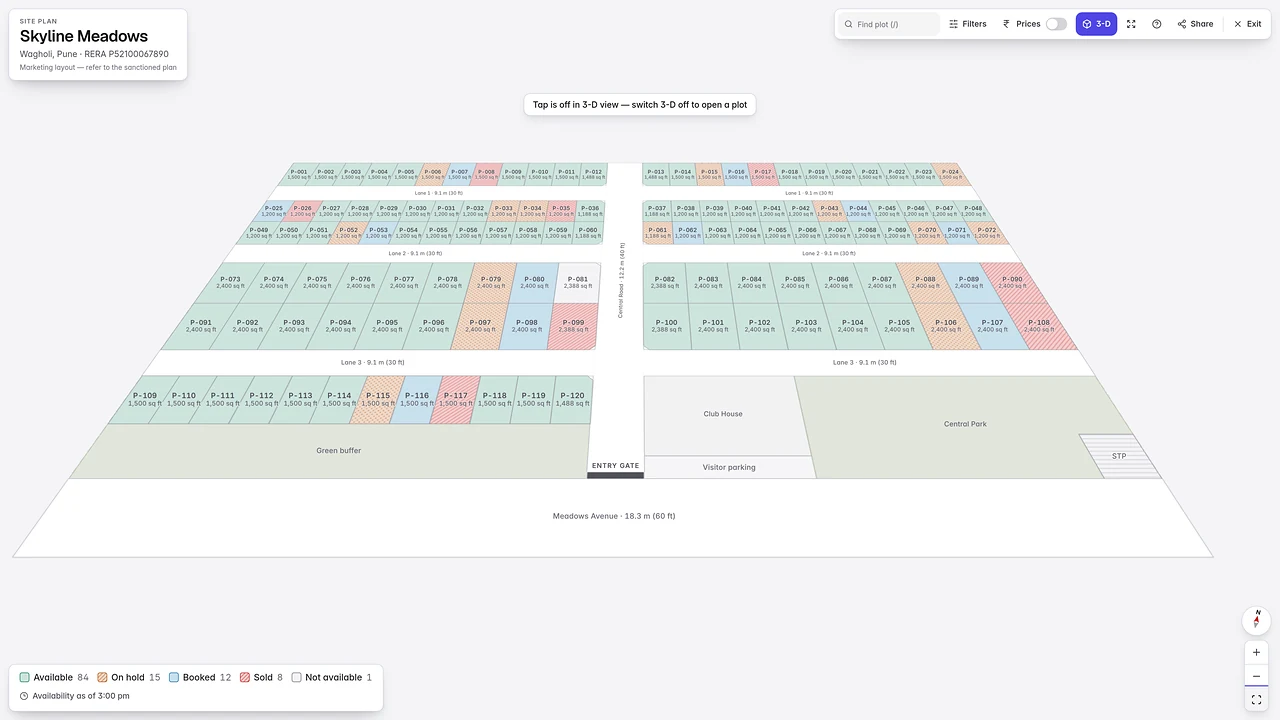
A SHARED RECORD. A RELEVANT VIEW.
Connect enquiries to projects, inventory and bookings. Give managers a view of follow-up and pending decisions.
For your sales organisation →Keep registrations and commission states visible. CP Connect brings the broker’s own records into a dedicated portal.
Professional Team and Custom
Keep payment schedules, documents and buyer queries connected to the booking. Offer Buyer Connect when enabled.
Buyer Connect: Professional Team and Custom
CLEAR PRICING
Solo is billed monthly or annually. Professional Team and Custom are billed quarterly, or 10% lower on annual.
One person, one seat
₹599/ month
₹6,468 a year — ₹539 a month · no automatic renewal
Leads, follow-ups, visits, inventory and bookings. Not a per-seat price, and it holds exactly one person.
Explore Solo →From two seats · your builder–broker workflow
₹899/ seat / month
₹809 per seat with annual billing · from ₹19,416 a year
Everything in Solo, plus team seats, assignment, approvals, team dashboards, channel partners, commission, CP Connect, Buyer Connect and ILMS site plans.
Get a demo →Scoped to your process
₹1,499/ seat / month
₹1,349 per seat with annual billing · ₹16,188 per seat a year
Professional Team, plus workflows built around your process — with a one-time setup fee, quoted on what you need, and deployment in 15–25 days.
Talk to us about Custom →See the pricing page for billing terms, included capabilities and scoped services. Professional Team and Custom are set up after a conversation, not bought from a screen.
BEFORE YOU DECIDE
The questions that shape your decision. Explore more in the help centre.
Indian real-estate builders, developers and channel partners who need to manage enquiries, sales follow-up, visits and bookings. Solo is for one person and holds exactly one seat; Professional Team starts at two seats and has no ceiling.
Supported portals and ad forms need account access, setup and a delivery test. WhatsApp linking needs Meta approval and setup too. WhatsApp sign-in through MSG91 is currently blocked by template availability; use email for account recovery.
Registration time and the workspace’s configured attribution window support ownership decisions. The default is 45 days. A phone call alone does not establish ownership.
Supported field actions queue on the device and sync later. Pending work stays visible and conflicts need review. Initial sign-in and some actions still need a connection.
We review your workflow in the demo and agree the setup steps. Imports, team access and provider approvals determine the timeline; there is no universal five-minute setup promise.
YOUR NEXT SAUDA STARTS WITH CLARITY
Bring your lead sources, project setup and questions.
We’ll walk through the product with you.